JavaScript Built-in Functions

            Whenever developing a project, you will have common solution that will come up and it is always good practice to keep track of these solutions to speed up development in the future. That is why many modern programming languages have a vast amount of built in function for you to use. Predefined functions are great for many reasons, top of which is it just makes everything simpler. Having to write your own function for every little sub problem is terribly inefficient and time consuming its always best to use a predefined function when you can. We will go over some of the most useful or common ones and explain each of them.

eval()

            Evaluate is a simple enough function like most built-in functions are. Eval() simply evaluates a piece of JavaScript code represented as a string. So, if you want if you want to evaluate two plus two you can do so.

eval(‘2 + 2’)    

  • 4

eval(‘2 + 2’) === eval(‘4’)

  • true

eval(“alert(‘this is executed by eval()’)”);

I think you understand how eval() works you can run any snippet of code you want in any part of your code.

While I am sure you can think of many uses for eval() and there are many cases where its useful and safe to use. Eval() is  considered a risky built in function as it has two major problems performance and security. Performance wise eval() runs its own interpreter/compiler this can be a big hit on performance as your code will need run a potentially heavy compiler in the middle of run time if your code is compiled. With this is most likely not detrimental to your code as JavaScript is mostly an interpretive language. The second risk on security is code  injections (1), if you are not familiar this is where a user types a particular kind piece of code into input portal of your application and your code runs that code by accident because you didn’t check the input. This is a huge security risk this is the main reason to be sparing of where you use eval(). In fact, I would suggest using eval independent of any user input as injections are some the most common security flaws in software and eval() is a very easy gateway.

parseInt()

            ParseInt is an extremely simple function, all it does is check if a string is an int and returns the integer it parsed from the string.

var b = parseInt(“10.00”)

b = 10

ParseInt does not really have any downside and obvious use is for when you are converting types. There are many more conversion built in function that might be useful to look up depending on your needs.

Escape and Unescape

            Lastly lets cover escape() and unescape() they are both remarkably similar so I decided to group them. They both convert text into a value, the difference being escape() return the hexadecimal encoding of the argument where as unescape() returns the ASCII value. Both have uses in many areas when you want to know data size, comparing values and so on.

            I hope this brief overview of some of these functions was useful happy coding!

Sources:
  1. https://stackoverflow.com/questions/197769/when-is-javascripts-eval-not-evil
  2. https://www.tutorialspoint.com/javascript/javascript_builtin_functions.htm

Advanced Ruby Methods Continued

            Like I discussed last week ruby has many useful built in functions, I will cover more of them in this blog post and show examples of how they are used.

<=>

            Lets first talk about the sort operator this is a very useful yet simple operator to use. The sort operator simply returns one of three things -1, 0 , 1, this lets you know if an object, array, or variable is less than, equal, or greater than. For an array, the sort operator compares each element to each other at the same index.

            [ “a”, “a”, “c” ]    <=> [ “a”, “b”, “c” ]   #=> -1

            This return negative one, as the ‘b’ is greater than ‘a’ (side not letters have values derived from ascii or Unicode tables) therefore the sort function returns negative one since the first array is smaller.

[ 1, 2, 3, 4, 5, 6 ] <=> [ 1, 2 ]            #=> +1

[ 1, 2 ]             <=> [ 1, :two ]         #=> nil

These next two examples show that if an array is longer it will be considered larger as it will be being compared to nothing. The second example shows that there are edge cases as it does not know how to compare two elements like the key in the second array so it returns nil.

bsearch

            The second method I will be talking about is bsearch or short for binary search. Which I am sure most have heard of binary search but in short it is simple a search that will find all the values in an array which meets a given condition in O(log n) time which is an extremely useful and efficient search algorithm.

ary = [0, 4, 7, 10, 12]

ary.bsearch {|x| x >=   4 } #=> 4

For this example, it simply finds the first element that is equal or larger than 4 it does not find all elements that are larger than 4.

ary.bsearch {|x| x >= 100 } #=> nil

You can also see it return nil if the condition is not met in the array.

fill

            Another useful yet simple method which allows you to  transform or overwrite an array in whatever way you would like.  If you have an array of a given size and want square all the numbers or fill it with completely different values or fill just part of the array fill allows you to do that.

a = [ “a”, “b”, “c”, “d” ]

a.fill(“x”)              #=> [“x”, “x”, “x”, “x”]

a.fill(“z”, 2, 2)        #=> [“x”, “x”, “z”, “z”]

a.fill(“y”, 0..1)        #=> [“y”, “y”, “z”, “z”]

a.fill {|i| i*i}         #=> [0, 1, 4, 9]

a.fill(-2) {|i| i*i*i}   #=> [0, 1, 8, 27]

As you can see the first example filled the whole array with ‘x’s then filled the last two spots with ‘z’s, by writing the fill element then the fill starting position then the number of fill elements. The next one fill the first two indexes with ‘y’s by instead of specifying the number of fill elements just specifying the index bounds to fill all them with. The next two use absolute indexes as a fill element squaring and cubing them.

Hopefully, these methods help you happy coding!

Source:

  1. https://ruby-doc.org/core-2.7.0/Array.html#method-i-fill

Advanced Ruby Loops

            While we’ve most likely all heard of the traditional “while” and “for” loops that most modern programming languages use. Many languages have a wide variety of loops, iterators and functions that behave like loops that are used to resolve a wide array programming problems in an efficient manner. For this blog we will be talking about loops and functions that can be used on ruby arrays, although many languages have may have similar processes the  fact that ruby is a dynamic open source languages means that it by far has the most of any main stream language. Besides that the main goal of this blog post is to get you wondering if there are built in functions or loops that you can look up and start using now,  that will allow you to save time programming, make your code more readable and more efficient. Regardless of the programming language you are currently using.

Select

            The first enumerator (class that allows both internal and external iterations) is select is an extremely useful function. I should be used when you are trying to filter down an array to the values that meet a certain condition. If you are familiar with SQL it works very similarly. If given the array [1, 2, 3, 4, 5] and you want to select all the even numbers you would simply write.

 [1,2,3,4,5].select {|num| num.even? }     #=> [2, 4]

This is obviously an extremely simple example but select is an extremely simple yet useful enumerator.

Map

            The next enumerator is to be used when you would like to transform all the elements of the incoming data structure uniformly. Say you want to want to find the square of all the numbers in the previous array you would write something like this.

[1,2,3,4,5].map {|num| num * num }     #=> [1, 4, 9, 16, 25]

Or a common use is to convert hash values to symbols, this is extremely useful as data can common in many shapes and sizes when you are using a open source API and its always best to convert your data so it is consistent across your applications. You could do this with this simple map function and the to_h function.

hash = { bacon: "protein", apple: "fruit" }
hash.map { |k,v| [k, v.to_sym] }.to_h
# {:bacon=>:protein, :apple=>:fruit}

Flatten

            This is an extremely straight forward ruby function; its man uses are to extract nested data from a structure. It is very convenient to use as it can be tiresome to write your own function that does the same thing. Flatten simply takes an array inside of an array for example and “flattens” it to a single array, for instance if you have the array t = [ 4, 5, 6, [7, 8] ] 

t = [ 4, 5, 6, [7, 8] ] hash.map { |k,v| [k, v.to_sym] }.to_h
t.flatten(1)       #=> = [ 4, 5, 6, 7, 8 ]

You probable noticed the number in the parenthesis this indicates the number of levels you would like to flatten the array by for instance if you had the array t = [ 4, 5, [6, [7, 8]] ]  

t.flatten(1)       #=> [ 4, 5, 6, [7, 8] ] 
t.flatten(2)       #=> [ 4, 5, 6, 7, 8 ]

Overall, most of these functions/loops/enumerators are pretty straight forward yet extremely useful. So, look them up for yourself I’m sure you will find many uses for them!

Sources:

  1. https://ruby-doc.org/core-2.7.0/
  2. https://www.rubyguides.com/

React Native

                React native, simply put is the mobile version of the very popular Facebook’s react framework. This is very much true, mainly they both have very similar syntax but there are some distinct differences between them when it comes commons to components, UI rendering, or DOM rendering. React native is in fact a completely different framework after all and it can be difficult for web react developers to jump into without a little trial and error. But compared to a react developer jumping into any other mobile framework or mobile programming language react native is by far the easiest framework for web developers and even frontend developers to start developing mobile applications. So, with that being said, lets first cover some the basic of what react native is and what are its major differences between it and reactJS.

                React native was developed in tandem with React and was released in 2015, react natives biggest difference is that it does not manipulate the DOM via a virtual DOM instead it runs a background process which interprets Javascript directly onto the user’s device via a native platform that uses “serialization, asynchronous, and batched bridge” (1). Basically, meaning it does a lot of translating concurrently in the background without the user noticing to make a beautiful seamless app that can be “ported” over to any mobile OS. The main advantage of react native over using Java with android studio or Swift for IOS is the ability to make native apps that would work for both. React native was by no means the first to do this, the ability to make cross-platform apps in a single framework had existed previously. In contrast Facebook was somewhat resistant to native architecture for a time but realized their mistake of relying too much on HTML, but quickly switched over to native for better and quicker data retrieval to make for a more stable and better mobile experience (1).  

                Now that you have the basic idea and history of react native let us talk about its advantages, big advantages over other mobile development platforms is its ecosystem this allows for cheaper and much quicker development. With the ability to have ready to use components and UI libraries this makes it much easier to develop apps with consistent UX and smooth UI experience (2). Secondly react native  uses Hot Reloading features which you might no as automatic refresh more colloquial if you are a reactJS developer. This gives you the ability to automatically reload when the DOM is changed instead of “dirty checking” react native carries this over which speeds up app development immensely.

            Overall react native is one of the best mobile development platforms out there it does have a few tricky spots compared to react like using animation API instead of CSS and so on. But all together it is one of the easiest mobile development platforms to learn and if you ever thought of developing a mobile app you should give it a try.

Sources:

  1. https://en.wikipedia.org/wiki/React_Native
  2. https://www.simform.com/reactjs-vs-reactnative/#:~:text=In%20Reactjs%2C%20virtual%20DOM%20is,which%20is%20nothing%20but%20javascript.

Mobile App Development

                                Mobile app development is one of the biggest areas of expertise for a programmer to get a job in, just look at any job site and you will see thousands of jobs for mobile app developers of every level. The thing being there are many ways to develop a mobile application, when talking about frameworks, devices, methodologies. We will be talking about the three important categories of mobile apps and what each of them are. The first of which is web applications.

Web Mobile Apps

                Web mobile apps are simply, web application with mobile first development in mind, designed to fit on a small screen and to be navigated with a touch screen. This might not sound exactly like a mobile app because it is not necessarily as you could access it without an emulator on your computer. This does not mean it cannot have the exact same complex functionality of any traditional mobile app. They are just apps that are optimized to run a on a mobile browser and be used on a smart phone. This is a convenient way to build or prototype a more traditional mobile app as it much cheaper and quicker to develop. Along with that it for the most part is going to be a lighter weight application as it will not require a bunch of SDKs that can be common with mobile development. In fact, they the exact same development path as making a traditional website, which they can be built in traditional HTML/Javascript or your favorite framework. The emphasis is on styling and user stories of how you want the app to be interacted with.

Hybrid Apps

                Secondly, hybrid apps are much closer to traditional apps but where they are downloaded from and app store but are rendered in a browser still like web apps, but this browser just happens to be embedded in the app itself. So, you are still installing this container onto your phone, but you are still basically running the app on a browser. This is because a hybrid app deploys in a native container that uses a WebView object, this WebView object then displays the application using the classic web technologies (HTML, JavaScript, CSS) (2). Hybrid apps can be slightly more difficult to develop as you are still reliant on having some knowledge of the device it will be running on but the setup can be the same across many apps as you are simply in a sense making a web app with a in a mobile container.

Native Apps

                Lastly, native apps are more what you think of when developing a mobile app, this kind of application development requires much more knowledge of the system you are creating it for and will most likely require you to use many SDKs. In fact most apps you use are native as even thought they are not nearly as light weight as they require the user to fully download the content onto their phone, they are much more responsive and reliable as they wont require internet access or less standardized tools which can be limiting depending on the platform you are developing them for. The niche features you might want that from outside SDKs not suitable for a native mobile is more than made up for all the features you can implement, native apps are the only apps that you can reliably use the phones hardware such as the camera, microphone, push notifications and so on. This obviously comes at a cost you must choose a very specific programming language or framework and stick to it and must follow the rules in a sense of how to develop it. Overall, it is much harder to develop a native app for these reasons. Having dabbled a little bit into app mobile app development making sure things stay up to date and run correctly can be difficult.

Well that was a brief run down of different types of mobile apps, they all have valid uses its up to you to decide which is the right path for your application.

Sources

  1. https://www.app-press.com/blog/web-app-vs-native-app#:~:text=A%20native%20app%20is%20one,Play%20or%20Apple’s%20App%20Store).&text=And%20native%20apps%20can%20use%20the%20device’s%20notification%20system.
  2. https://www2.stardust-testing.com/en/blog-en/hybrid-apps#:~:text=Hybrid%20apps%20are%20deployed%20in,adapted%20to%20a%20WebView%20display.
  3. https://www.mobiloud.com/blog/native-web-or-hybrid-apps

Binary Search Trees

There are many different data structures that serve many purposes and some can be more difficult to use than others. Some lack efficiency but are easy to use vice versa, a great data structure that is consistent in space and time efficiency is binary search tree or BST. For this blog we will be focusing on how to structure and use a binary search tree.

If you are not familiar Binary search trees are node based sorted binary trees in which all nodes left of the root are less and all nodes greater than the root are more. Basically if you take the list [1, 3, 4, 6, 7, 8, 10, 13, 14] so you first take the median number which in this case is 8, then take the all the values to the left and then organize them by the same rules in a subtree and so on, then do the same to all the values on the right of 8. Here is how it looks mapped out.

I will binary search tree is also setup with two simple constructors, but which will help you understand how they work.


 // Node class 
 class Node 
 { 
     constructor(data) 
     { 
         this.data = data; 
         this.left = null; 
         this.right = null; 
     } 
 }
 // Binary Search tree class 
 class BinarySearchTree 
 { 
     constructor() 
     { 
         // root of a binary seach tree 
         this.root = null; 
     } 
   
     // function to be implemented 
     // insert(data) 
     // remove(data) 
                   
   
     // Helper function 
     // findMinNode() 
     // getRootNode() 
     // inorder(node) 
     // preorder(node)                
     // postorder(node) 
     // search(node, data) 
 }  

The main reason to use binary search trees is there simplicity and run time there space is always O(n), insert() runs at average O(log n) and worst of O(n) and same for search and traversal is O(n). If you see in the BinarySearchTree class, there’s some helper functions we need to create so let’s start with insert. To insert we will need to walk down the tree and find where the value is needed. We must compare the value to the root and if its less then walk down the tree to the left then compare to the next node value, if its greater than the next node value then walk down to the right. Here is how we implement the insert in code.


 <!--  /* Font Definitions */  @font-face {font-family:"Cambria Math"; panose-1:2 4 5 3 5 4 6 3 2 4; mso-font-charset:0; mso-generic-font-family:roman; mso-font-pitch:variable; mso-font-signature:3 0 0 0 1 0;} @font-face {font-family:Consolas; panose-1:2 11 6 9 2 2 4 3 2 4; mso-font-charset:0; mso-generic-font-family:modern; mso-font-pitch:fixed; mso-font-signature:-520092929 1073806591 9 0 415 0;}  /* Style Definitions */  p.MsoNormal, li.MsoNormal, div.MsoNormal {mso-style-unhide:no; mso-style-qformat:yes; mso-style-parent:""; margin:0in; margin-bottom:.0001pt; mso-pagination:widow-orphan; font-size:12.0pt; font-family:"Times New Roman",serif; mso-fareast-font-family:"Times New Roman";} code {mso-style-noshow:yes; mso-style-priority:99; font-family:"Courier New"; mso-ascii-font-family:"Courier New"; mso-fareast-font-family:"Times New Roman"; mso-hansi-font-family:"Courier New"; mso-bidi-font-family:"Courier New";} .MsoChpDefault {mso-style-type:export-only; mso-default-props:yes; font-family:"Calibri",sans-serif; mso-ascii-font-family:Calibri; mso-ascii-theme-font:minor-latin; mso-fareast-font-family:Calibri; mso-fareast-theme-font:minor-latin; mso-hansi-font-family:Calibri; mso-hansi-theme-font:minor-latin; mso-bidi-font-family:"Times New Roman"; mso-bidi-theme-font:minor-bidi;} @page WordSection1 {size:8.5in 11.0in; margin:1.0in 1.0in 1.0in 1.0in; mso-header-margin:.5in; mso-footer-margin:.5in; mso-paper-source:0;} div.WordSection1 {page:WordSection1;} --> 
 // Method to insert a node in a tree 
 // it moves over the tree to find the location 
 // to insert a node with a given data  
 insertNode(node, newNode) 
 { 
     // if the data is less than the node 
     // data move left of the tree  
     if(newNode.data < node.data) 
     { 
         // if left is null insert node here 
         if(node.left === null) 
             node.left = newNode; 
         else
   
             // if left is not null recur until  
             // null is found 
             this.insertNode(node.left, newNode);  
     } 
   
     // if the data is more than the node 
     // data move right of the tree  
     else
     { 
         // if right is null insert node here 
         if(node.right === null) 
             node.right = newNode; 
         else
   
             // if right is not null recur until  
             // null is found 
             this.insertNode(node.right,newNode); 
     } 
 }  

So, now you know the basics of how to implement and create a insert function of binary tree, hope this blog helps.

Sources

  1. https://www.geeksforgeeks.org/binary-search-tree-data-structure/

Solving Coding Challenges

            Being presented with an algorithm or whiteboarding problem can be daunting and is part of most software engineering interviews. It can be extremely challenging to solve a coding challenge on the fly where you have tons of pressure and you feel like you do not have time to think but there are a few steps and strategies to help solve any coding challenge presented to you. Disclaimer like most these blogs I am no where close to an expert and this is mostly and excuse to help myself by compiling information in one easy place.

Understand the Problem

It might seem obvious but the number of times I have been too eager to start the challenge and miss an important part of the question and end up going down the wrong path or missing an edge case. Before diving in make sure you have thoroughly and correctly read or heard the question. Reread the question write down the question

if prompted verbally so you have something to go back to while writing the solution. Ask question if needed not one will doc points off for clarify quite the contrary from my understanding one of the biggest purposes of a whiteboarding interview is not to make sure you are some coding genius who can solve the presented problem in two minutes without asking a single question. They want to see what your problem-solving process is like and on some level how you collaborate. Make sure to take the time to clearly understand the problem and write down examples, input, output and so on. This will start to get your brain flowing on possible solutions.

Break down the Problem

This also might go hand in hand with understanding the problem but sometimes you get started on a problem and realize you have thought about the solution at too high of a level didn’t break the problem down it to small solvable chunks. This can lead to backtracking and rewriting code which is a waste of time. You must break down the problem into smaller and easier version of the overall problem or subproblem. This will allow you to further understand the problem while allowing you to start planning functions and data structures to use along with this if the problem ends up being beyond your skill level you have something to show for your effort as you most likely solve some easier part of the overall question.

Choose a solution and Outline

For most coding challenges there is a lot of different ways you can solve one problem, but you must choose one for certain solutions its easier to do things recursively or with a hash. It can be difficult to know exactly how you want to solve it before but a good way to get started if you are stuck is to quickly solve the problem manually to derive the algorithm for the question, then solve the problem programmatically. Once you know the general direction of your solution you can work from there identify what helper functions, edge cases, terminating logic and data structures you will need to solve it.

Improve your code

Lastly, once you have found and coded a solution try to improve it, in whatever way you can. Ask yourself is there a simpler and more clear way to do this, can I make it more efficient,  did I miss something, would this this data structure benefit from being a different one. There are many ways to improve your code and chances are the code you just wrote on the fly could be improved, so be self-aware even though you don’t know how to improve it at least point out an area that you could improve.

Well I hope some of this was helpful best of luck to all on their coding challenges.

AJAX

Today we will be talking about something that many of you have already used knowing it or not; Asynchronous JavaScript and XML or AJAX. Now a days AJAX is not necessarily the best name for this set of web techniques as XML is not nearly as popular as it used to be. You might have picked up on it in that last sentence, but a lot of people think AJAX is a library, framework or some piece of technology but all AJAX is an approach or technique to build websites, its simple as that just a different way of structuring apps.

 AJAX came about like many other techniques we use today in web development in the early 2000s, when we knew for the most part to make a “modern” website or web application at the time we needed to use five things: HTML, the DOM, JavaScript, CSS, and XMLHTTP requests ( a API that allows you to make HTTP request from the browser using JavaScript). AJAX wasn’t something that was necessarily explicitly developed by one person, team or even company, it was simple an evolution of extremely skilled developers coming up with techniques collaboratively or independently that gradually formed AJAX. The whole key or main goal of AJAX was using existing technologies to create applications that can update and change content dynamically without refreshing the page. So, simply put before AJAX for the most part website could not send or receive request data in the background without disturbing the current page and this led to the popular term today single page web applications. The idea of AJAX is so commonplace today most websites and phone apps you use implement it in some form or another but before these ideas arose, many websites did not use it as it was difficult to implement.

 I’m sure many of you remember older sites and how clunky they would feel and how many times the page would need to refresh, now if you use anything like Instagram or pinterest all the images and information is loaded dynamically into the page. Popular sites now a days that don’t use AJAX are something like craigslist and reddit, which yes they are both easy targets as no one has ever called either of them dynamic cutting edge websites but they are still delightful and extremely useful sites that have yet to be dethroned for many uses. You will notice when you use both these sites you have to deliberately click next page to load the next page this is the request getting sent and the page is refreshing.

The important take away from AJAX is that it is an idea, that the workflow for a website such be able to make back and forth request to the server without disrupting the running page. There are many ways to do this the old school being where AJAX got its name XML HTTP or JSON HTTP requests which has the benefit of being absolutely implemented across all browsers then we have newer approaches like fetch and third-party libraries like JQuery and Axios. I hope this brief overview was helpful thanks for reading.

Sources:

  1. https://en.wikipedia.org/wiki/Ajax_(programming)

Firebase

            Creating a full stack web, or mobile app can difficult as solo developer at times, there can be a lot of code to look out for to make sure your app is secure and efficient. Especially while creating a backend, and sometimes you need much more simplified backend, and it seems a bit tedious and time inefficient to create whole API for simple picture upload application. This where tools like Google’s Firebase come in a cloud-based storage/backend for your apps. Firebase makes it much easier and quicker to make a backend with built in features like:

  • Cloud Messaging: Deliver and receive messages in a more reliable way across platforms
  • Authentication: Have a lot less friction with acclaimed authentication
  • Hosting: Deliver web content faster
  • Remote Configuration: Customize your app on the go
  • Test Lab: Test in the lab instead of on your users
  • Crash Reporting: Keep your app stable
  • Realtime Database: Store and sync app data in realtime
  • Storage: File storing made easy

(1). Firebase is a collection of products to help build add in the data and feature needed to create a modern professional level application, in this blog we will primarily be focused on Firestore. Firestore is NoSQL (non-relational) document database that allows to easily store, sync, and query data for a mobile and web applications (2). The user friendly interface allows you to build collections (basically a DB table for non-relational databases) by simply creating a project and then creating a db and then any collection you want. So lets do a simple walk through of creating a Firebase app.

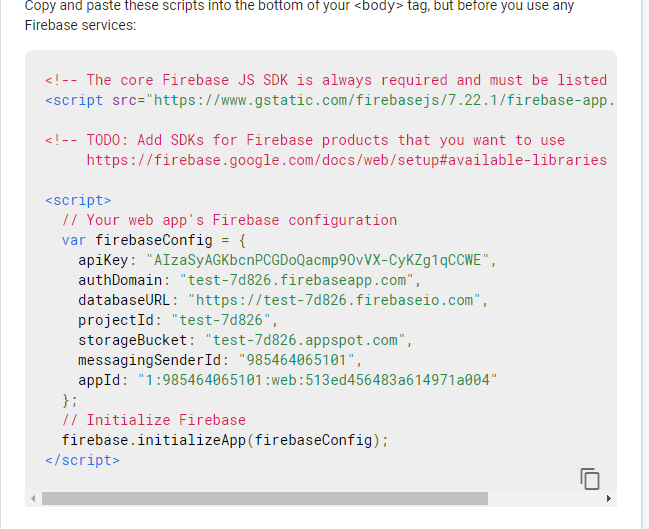
First go to https://console.firebase.google.com/  (sign into gmail) then click Add project, then name the project. Decide whether you want google analytics that’s up to you on a case by case basis, if you are developing a larger scale app you might like some of these features. Then once your project is created, you will be brought to the firebase overview page and you will see in the middle a git started by creating an app click on one of the three options and register your app. This will then present you with an SDK code snippet to link your app to firebase.

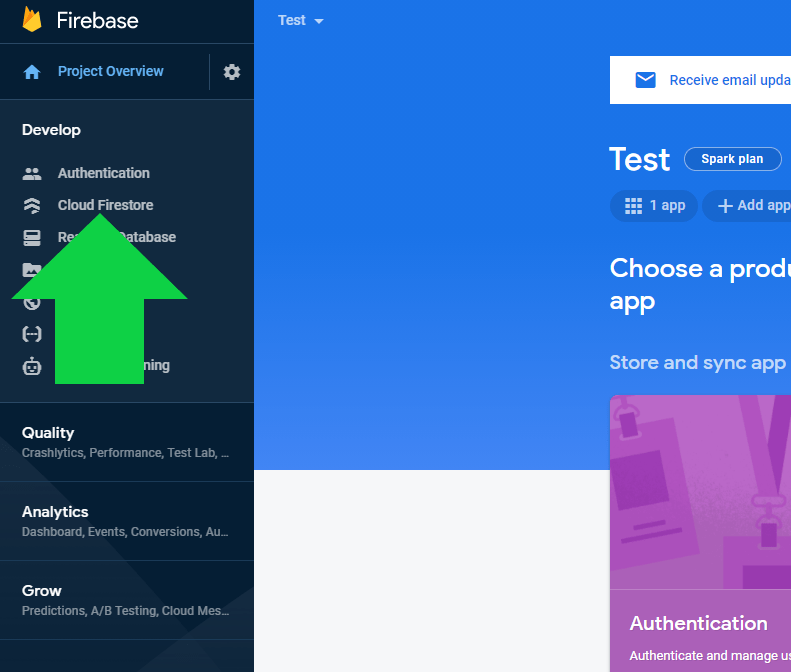
After which continue to the console you will see  a taskbar on the left side from there click Develop then click Cloud Firestore.

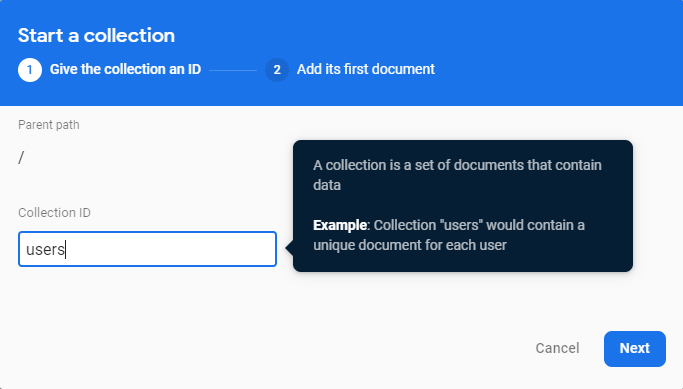
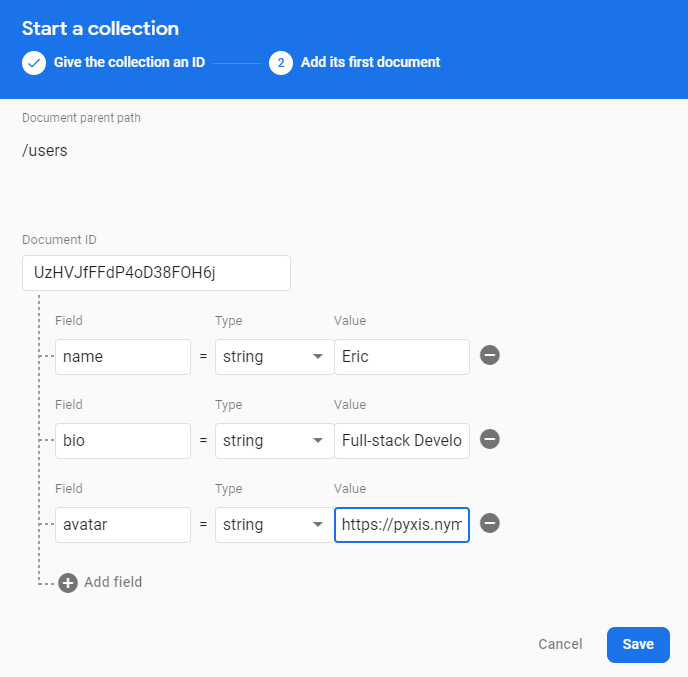
This will bring you to the Firestore page which will allow you to make collections, rules, indexes and have metadata on usage. Click on the Data tab to create a collection, then click on create collection name the collection, I chose users then you can structure and fill out the collection accordingly.

They have a variety of data structure to pick from but overall, you can change these no matter what and NoSQL database don’t really care about the data structure anyways, so I wouldn’t worry about it anyways. Along with this you can give the structure an initial value if you want, like I did or leave it blank.

Sources:

  1. https://www.semrush.com/blog/4-reasons-why-google-s-firebase-is-essential-if-you-have-a-business-app-1-1-1/
  2. https://firebase.google.com/products/firestore

CSS Flexbox

            Being a full-stack web developer, it can be difficult to design an app UI especially not knowing a ton of CSS. So, a lot of us resort to prebuilt styling like bootstrap and material UI, while both of these are easy to use and look pretty good it lacks a lot of customizability compared to writing your own CSS. If you have tried to make write your own style one of the hardest things is position the elements where you’d like and consistent styling between pages. This is where flexbox comes in, flexbox reacts and orientates the elements in automatically based upon other elements on screen and the size of the screen using a few simple properties which we will go over.

display: flex;

This defines flex container, inline or block. Allowing all the subsequent children of the element to take advantage of the flexbox properties.

flex-direction

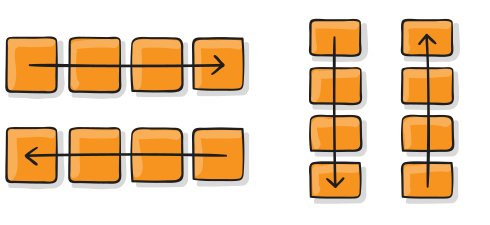
Flex direction like its named tells the flex elements what direction to orientate themselves. The flex elements can be organized as row, reverse row, column and reverse column.

A picture containing diagram

Description automatically generated

flex-wrap

Wrap tells the elements to go to a new line or not when they hit the edge of the container. By default, flex will just make everything on the same line but with property flex-wrap: wrap; the elements will now go to a new line instead of resizing all elements to fit on a line. The commands you can use for flex-wrap

flex-wrap: wrap; /* new line when edge of container is reached.*/
flex-wrap: nowrap; /* specifically telling the container to not wrap.*/
flex-wrap: wrap-reverse; /* same as wrap but reverse the elements so the order on the second row is reversed. */

A picture containing icon

Description automatically generated

flex-flow

Flex flow simply combines the prior two properties, so instead of writing both for example like

flex-flow: column wrap;  /* this is just combining flex-direction: column; flex-wrap: wrap; just simple shortcut. */

justify-content

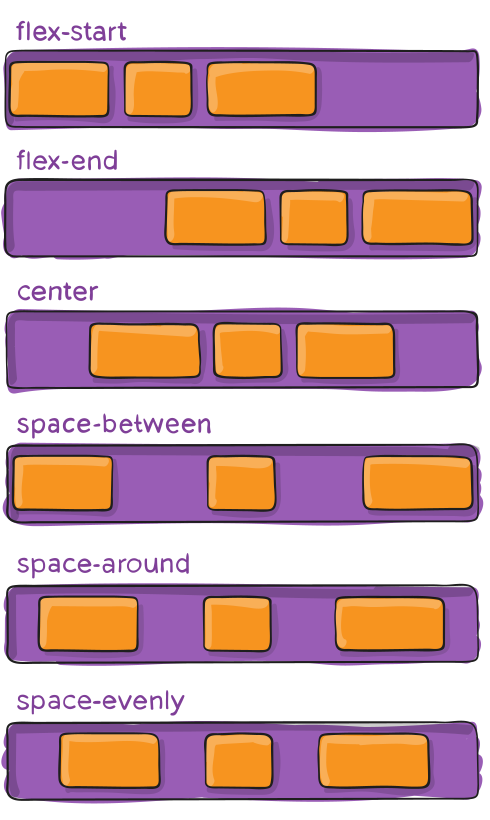
Justify content is a extremely important property with a lot of options, but simply put it tells the elements how they should all behave along the main axis. If you want all the elements to go to the center, right, left or with space between them. Here are some of the properties of justify-content but there are a lot more.

justify-content: flex-end; /* this is just the opposite of start, now at the end of the container*/
justify-content: right; /* elements to the right */
justify-content: left; /* elements to the left */
justify-content: center; /* all flex elements  to float center */
justify-content: space-between; /* this tells the elements to have space between each element  variants are space-around, and space-evenly, which both do what you’d expect */

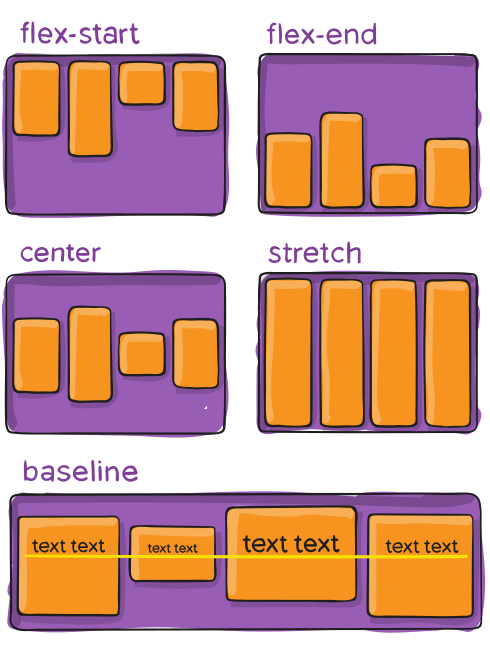
align-items

Similar to justify content but on the cross axis instead. Align items has a lot of similar options as justify content so here is a quick list.

 align-items: stretch | flex-start | flex-end | center | baseline | first baseline | last baseline | start | end | self-start | self-end + … safe | unsafe;

Well I hope this brief overview of the flexbox was helpful there are many more properties but these should be enough to get you started.

Sources:

  1. https://css-tricks.com/snippets/css/a-guide-to-flexbox/
Design a site like this with WordPress.com
Get started