Being a full-stack web developer, it can be difficult to design an app UI especially not knowing a ton of CSS. So, a lot of us resort to prebuilt styling like bootstrap and material UI, while both of these are easy to use and look pretty good it lacks a lot of customizability compared to writing your own CSS. If you have tried to make write your own style one of the hardest things is position the elements where you’d like and consistent styling between pages. This is where flexbox comes in, flexbox reacts and orientates the elements in automatically based upon other elements on screen and the size of the screen using a few simple properties which we will go over.
display: flex;
This defines flex container, inline or block. Allowing all the subsequent children of the element to take advantage of the flexbox properties.
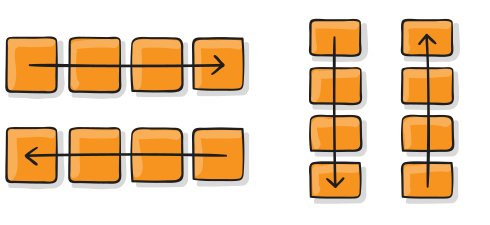
flex-direction
Flex direction like its named tells the flex elements what direction to orientate themselves. The flex elements can be organized as row, reverse row, column and reverse column.
flex-wrap
Wrap tells the elements to go to a new line or not when they hit the edge of the container. By default, flex will just make everything on the same line but with property flex-wrap: wrap; the elements will now go to a new line instead of resizing all elements to fit on a line. The commands you can use for flex-wrap
flex-wrap: wrap; /* new line when edge of container is reached.*/
flex-wrap: nowrap; /* specifically telling the container to not wrap.*/
flex-wrap: wrap-reverse; /* same as wrap but reverse the elements so the order on the second row is reversed. */
flex-flow
Flex flow simply combines the prior two properties, so instead of writing both for example like
flex-flow: column wrap; /* this is just combining flex-direction: column; flex-wrap: wrap; just simple shortcut. */
justify-content
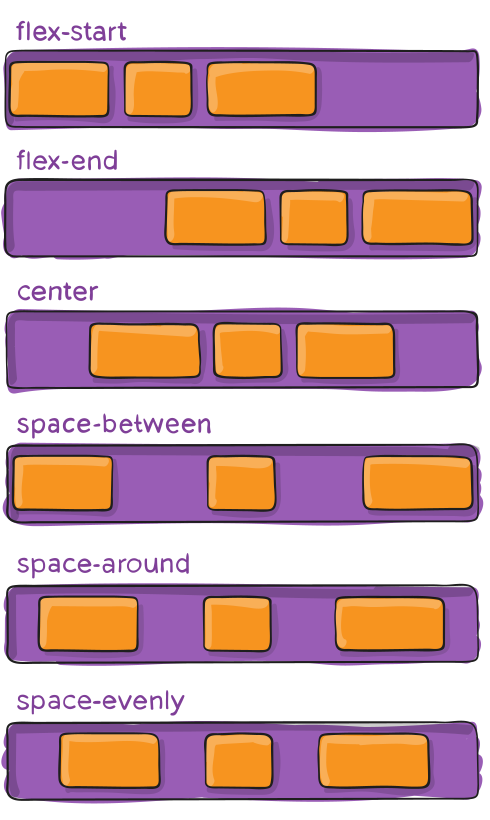
Justify content is a extremely important property with a lot of options, but simply put it tells the elements how they should all behave along the main axis. If you want all the elements to go to the center, right, left or with space between them. Here are some of the properties of justify-content but there are a lot more.
justify-content: flex-end; /* this is just the opposite of start, now at the end of the container*/
justify-content: right; /* elements to the right */
justify-content: left; /* elements to the left */
justify-content: center; /* all flex elements  to float center */
justify-content: space-between; /* this tells the elements to have space between each element  variants are space-around, and space-evenly, which both do what you’d expect */
align-items
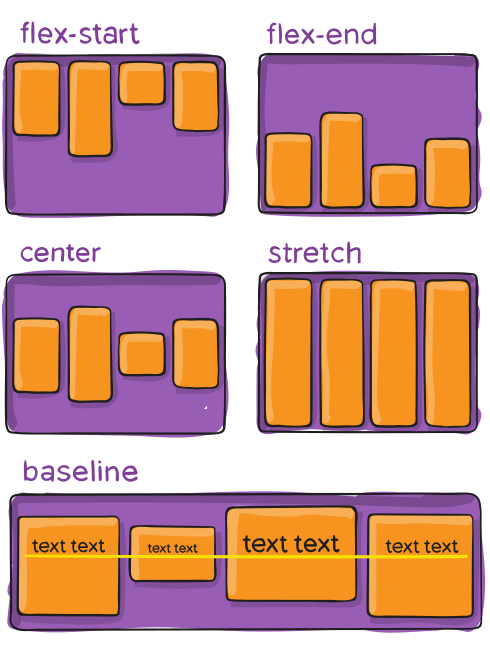
Similar to justify content but on the cross axis instead. Align items has a lot of similar options as justify content so here is a quick list.
align-items: stretch | flex-start | flex-end | center | baseline | first baseline | last baseline | start | end | self-start | self-end + … safe | unsafe;
Well I hope this brief overview of the flexbox was helpful there are many more properties but these should be enough to get you started.
Sources:
 I Feel All Sorts of Ways About Programming